
Bank statements to Excel, CSV and QuickBooks. Checked to the cent.
Documentric converts PDF bank and credit card statements into clean transactions, then checks them against the statement's own opening and closing balances. If anything is off, you see the exact gap and the row, beside the original PDF.
Free plan: 10 pages a month, no card needed. Paid plans from $19 a month for 300 pages.
- Excel
- CSV
- QuickBooks .qbo
- Xero
- Sage
- Quicken QIF / QFX
- OFX
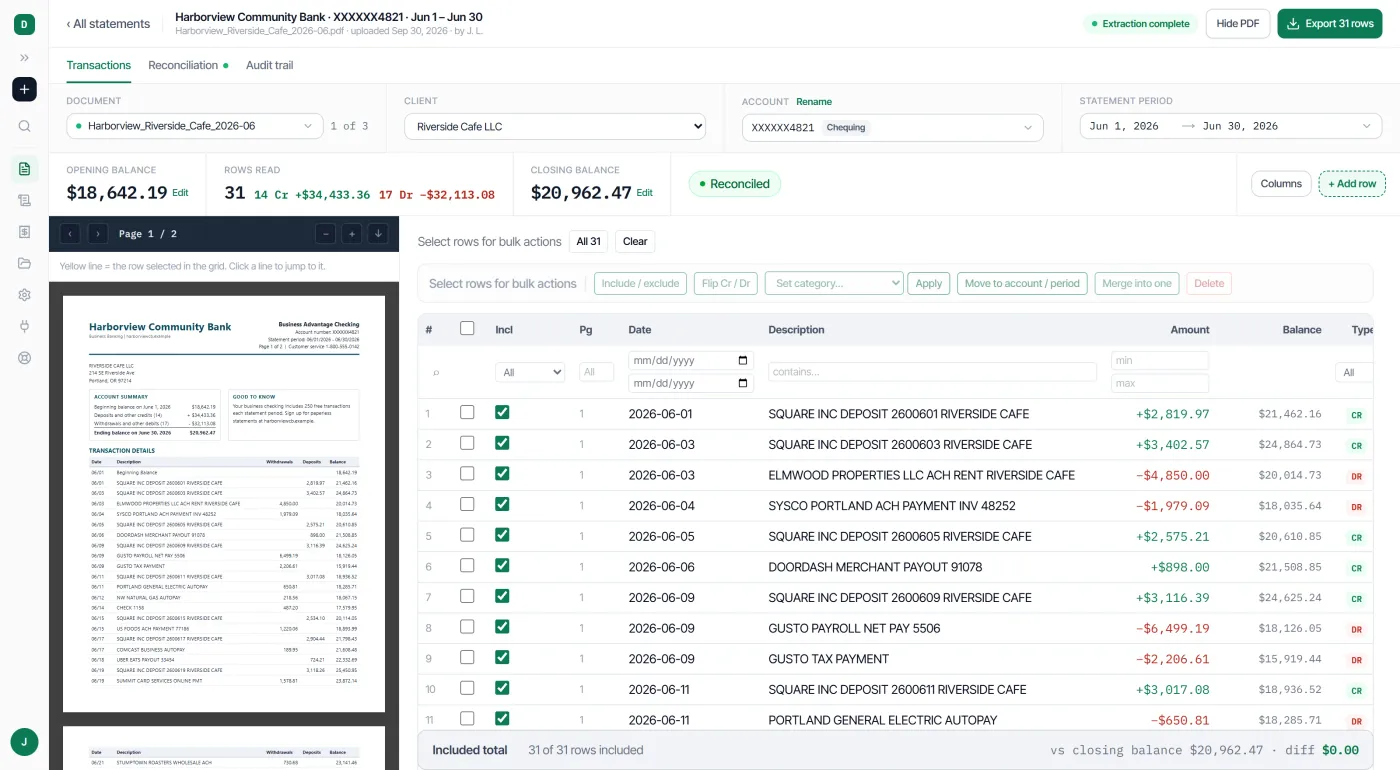
- Opening balance
- $18,642.19
- + Credits (14)
- $34,433.36
- − Debits (17)
- $32,113.08
- Closing balance
- $20,962.47
- Printed on statement
- $20,962.47
- Difference
- $0.00
Bookkeepers and accounting firms run their statements through Documentric
They have converted more than 12,000 pages with it so far, and every statement was run through the same balance check you see above.
Updated daily from our own records, rounded down.- Pages converted
- 12,000+
- Bank and credit card statements
- 2,200+
- Transactions read
- 99,000+
- Paying customers in
- US, Canada and UK
How to convert a bank statement PDF to Excel, CSV or QuickBooks. Four steps, about a minute a statement.
Upload the PDF, and Documentric reads every page and checks it against the statement’s own balances. You review the rows beside the original, then download Excel, CSV or a QuickBooks file.
- 1
Upload your statements
Drop in bank or credit card PDFs, one or a whole batch, and choose the client. Scanned statements work, and so do PDFs the bank has locked against printing or editing.
- 2
We read and check every page
We find the printed opening and closing balances and check that the rows add up to them. A typical statement is ready in about a minute.
- 3ties to the cent
Review every row beside the PDF
Click a row to see the line it came from. Fix anything and the balance check updates, so you see the exact difference before you export.
- 4
Download Excel, CSV or QuickBooks
Or Xero, Sage, Quicken and OFX, with a preview of the file first. Professional and Business plans can download a quarter as one ZIP.
Features for bookkeepers and accounting firms. Checked, filed and exported the way you work.
Documentric runs every statement through the balance check, files it under the right client and exports it the way your accounting software expects. Every client’s statements sit in one register, and a person answers when a file needs a closer look.
Numbers you can check
See exactly where a statement doesn’t add up
When a statement doesn’t reconcile, Documentric shows by how much and which printed total is off, so you fix the right row instead of hunting for it.
- Credit card statementsChecked against the previous and new balance
- Nothing silently droppedSet-aside lines listed, one click to restore
- Audit trailEvery edit and export, kept as a history
Built for client work
Every client’s statements in one place, with gaps flagged.
- Client registerFiled by client, bank and month
- Missing months flaggedSee the gap before you file the quarter
- Bulk ZIP downloadA whole quarter in one file, on Professional and Business
Fits the software you use
Files that import cleanly the first time.
- QuickBooks OnlineInvoices as bills, receipts as purchases
- CSV templatesYour columns and date format, saved
- Seven export formatsExcel, CSV, QBO, Xero, Sage, Quicken, OFX
- Invoices and receiptsLine items and totals beside the PDF
A person behind it
Real help when a file needs a closer look.
- Support ticketsA person replies, within 12 hours on Business
- We convert it for youSend us a tricky file and get it back done
Who Documentric is for. Bookkeepers first, and anyone who has to trust a statement.
Documentric is built for bookkeepers and accounting firms, business owners, lenders, family law attorneys and financial investigators. Each of them needs a bank statement’s transactions in a spreadsheet, and needs to know the rows add up to the balances the bank printed.
- Accountants and bookkeepersEvery client’s statements in one register, with missing months flagged before you file.
- Business ownersGet your statements into QuickBooks or Excel without retyping a row.
- Lenders and underwritersStatement data you can check against the PDF, with the balances already tied out.
- Family law attorneysTransaction histories for disclosure, with every edit kept in the audit trail.
- Financial investigatorsEvery row traced to its page, so any figure can be found in the original.
Bank statements look simple until you have to retype one. So Documentric checks every row against the balances the bank printed, and tells you plainly when something doesn’t add up, and by how much. If a statement still won’t convert, send it to us from the app. We’ll convert it and send it back, and a real person replies to you.
Support · a real person replies, within 12 hours on Business
Bank statement converter pricing. Start free, then from $19 a month.
Documentric is free for 10 pages a month, with no card. Paid plans are $19, $49 and $129 a month for 300, 900 and 2,500 pages. Paying yearly gives you two months free and the whole year of pages upfront, and on paid plans extra pages are $0.10 each, bought in advance.
| Plan | Pages a month | Price a month | Per page | Reply within | What it includes | Choose |
|---|---|---|---|---|---|---|
| FreeTry it on your own statements | 10 | $0no card | – | 72 h | The balance check, rows beside the PDF, Excel, CSV and QuickBooks files. | Start free |
| StarterFreelancers and solo bookkeepers | 300 | $19or $15.83 a month yearly, 3,600 pages upfront | $0.063 | 48 h | Everything in Free, plus documents of any length and extra pages when you need them. | Choose Starter |
| ProfessionalMost popularAccounting firms and higher volume | 900 | $49or $40.83 a month yearly, 10,800 pages upfront | $0.054 | 24 h | Everything in Starter, plus Bulk ZIP download and priority processing. | Choose Professional |
| BusinessHigh-volume teams and lenders | 2,500 | $129or $107.50 a month yearly, 30,000 pages upfront | $0.052 | 12 h | Everything in Professional, plus the fastest replies. | Choose Business |
More than 2,500 pages a month? Talk to us about a plan for your volume.
A person behind every plan.
Every plan gets a real reply: within 72 hours on Free, 48 on Starter, 24 on Professional and 12 on Business.
If a statement won’t convert cleanly, send it to us from the app and we convert it and send it back.
We read every request. A customer asked to choose and order their CSV columns, so we built it: pick your columns, put them in order and save it as a template.
Every plan runs the balance check, shows the rows beside the PDF and exports Excel, CSV and QuickBooks files.
Need more in a busy month? On any paid plan, extra pages are $0.10 each, bought in advance from 100 pages, and they never expire.
DocuClipper prices from its pricing page, billed monthly, checked 23 Oct 2026. Its free trial runs 14 days and up to 120 pages, and its pricing page says exporting needs an upgrade.
Questions bookkeepers ask. Answered plainly.
The things people ask before they upload their first statement.
Ask us. A person reads every message and replies within:
What is a bank statement converter?
A bank statement converter reads a PDF bank or credit card statement and turns its transactions into a spreadsheet or accounting file, such as Excel, CSV or a QuickBooks .qbo file. Documentric also checks the transactions against the statement’s own opening and closing balances, so you know the file adds up before you import it.
Which banks does Documentric work with?
It reads the layout of each statement instead of using a template for each bank, so a bank it has not seen before works the same way. Customers in the US, Canada and the UK use it today. Statements in languages other than English have not been tested yet.
How do I know the numbers are right?
Every statement is checked against its printed opening and closing balances. If the rows don’t add up, you see by how much and which printed total disagrees, and you can click any row to see the line it came from in the PDF.
How long does a statement take?
Most statements are ready in about a minute. Over the last 30 days, half were ready within 56 seconds of upload and nine in ten within two minutes.
Can I import the file into QuickBooks?
Yes. Bank and credit card statements download as a .qbo Web Connect file that QuickBooks imports directly. Invoices and receipts can be sent straight to QuickBooks Online as bills and purchases, with the PDF attached.
Which formats can I download?
Excel, CSV, QuickBooks (.qbo), Xero, Sage, Quicken and OFX. For CSV you can choose and order your columns and save them as a template, so every month imports the same way.
Is there a free plan?
Yes. The free plan gives you 10 pages every month with no card and no time limit. Paid plans start at $19 a month for 300 pages.
Does it work with scanned or locked PDFs?
Scanned statements are read like any other. PDFs the bank has locked against printing or editing work too. A PDF that needs a password to open can’t be converted yet.
What if a statement doesn’t convert cleanly?
Send it to us from the app. We convert it and send it back. A person replies within 72 hours on Free, 48 on Starter, 24 on Professional and 12 on Business.
Is my data safe?
Files travel over TLS 1.2 or higher and are encrypted at rest with AES-256. They’re kept until you delete them, which takes one click. We never sell your data or use your documents to train AI models, and payments go through Paddle, so we never see your card number.
Convert your next statement free. Check it to the cent before it reaches your books.
10 pages a month on the free plan, no card. Upload a PDF from your bank, review every row beside the original, and download Excel, CSV or QuickBooks.
Free plan: 10 pages a month, no card needed. Paid plans from $19 a month.